

As you know, the need for data access and editing codes that need to be written with Entity Framework has decreased considerably with ‘ORM’. Instead of writing SQL queries, we create our classes on the platform we develop on and transfer our design to the database by making migrations. Similarly, we can easily transfer data from the database used to the platform where the development is made with DbContext and LINQ queries. So, is the data we provide from the database always the most appropriate data? Should we transfer data from the database to our project if it is not clear whether it will be used or not?
In this article, I will talk about the Loading methods that can be used to properly transfer the data we will transfer from the database to the development environment.
There are three Loading types under the heading Entity Framework | Load Related Data. These are:
- Eager Loading
- Explicit Loading
- Lazy Loading
These three loading types serve different purposes and have their own + and -. If you want, let’s start the review with the title ‘Eager Loading’.
Eager Loading
Eager Loading is a method used in cases where the desired data and other data related to it will be used frequently. This method aims to obtain and use all data at once, despite obtaining it when it will be used. With this method, it is aimed to increase efficiency by making a large and small number of queries rather than database queries, the number of which can increase considerably according to the need for use. I would like to give an example to make the purpose of using this method concrete.
For example, you are developing an e-commerce project and you want a customer visiting your e-commerce site to be able to instantly see the information about that product when they want to examine it. Meeting this request, pulling the relevant information from the database together and reflecting it to the user in an appropriate manner can be achieved with the ‘Eager Loading’ method.
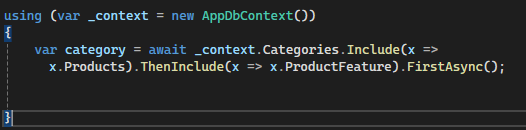
When using the Eager Loading method, we combine the data we will access via the dbContext instance we created with the other data we will use with that data with the ‘Include()’ method. If we want to use the data in its child table along with the data we added with the Include method, we can use the ‘ThenInclude()’ method.
In the image above, I obtained the category data, the product data associated with the category, and the ProductFeature data related to the product from a single query.
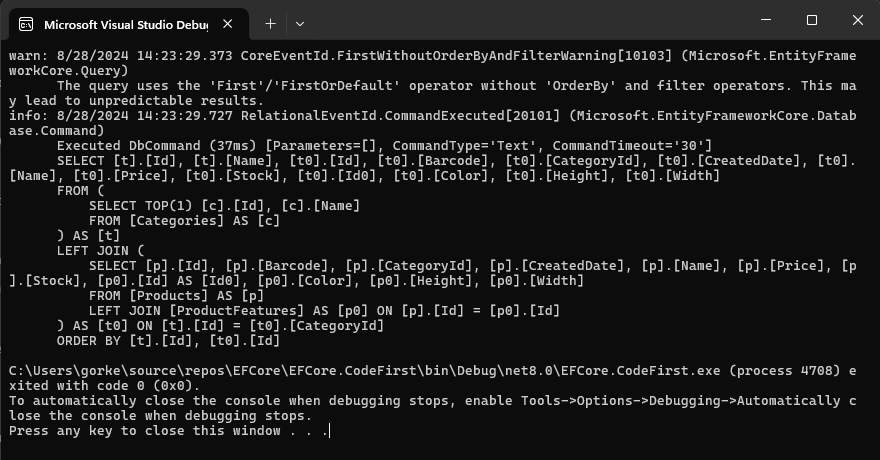
The query I created is transferred to the database as follows: As you can see, I have obtained the related data that I will use with a single query.

As can be seen in the image, I was able to obtain and use the relationship data with a single query.
If you want, let’s take a look at the advantages and disadvantages of this method.
Advantages of Using Eager Loading
1. Fewer Queries
The number of queries made to the database decreases because other data related to the data to be used is obtained in a single pass. Since each request to the database server and the response related to it has a waiting period, reducing the number of queries will have a positive effect on network latency as it will reduce the request-response waiting period.
2. Ease of Use
Easy access to the data to be used and the associated information provides ease of use for the developer.
3. Quick Access to Related Data
Since the main data and related data are obtained with a single database query, it does not require any additional database queries. Therefore, access to related data is fast.
Disadvantages of Using Eager Loading
1. Loading Unnecessary
Data Although it is stated that the data associated with the main data is used in cases where it will be used frequently, in some cases it may not be desired to use some of the associated data (for example, when 49 out of 50 related data are intended to be used, the remaining 1 data will occupy unnecessary memory space).
2. Performance Impact
The complexity of the main data and related data, the inclusion of large data groups in the query may increase the waiting time in the database. This waiting time may cause delays on the application side. I believe we have general information about the Eager Loading method. If you wish, let’s move on to our other method, the ‘Explicit Loading’ method.
Explicit Loading
The Explicit Loading method allows related data to be included when needed. With this method, more control is provided over the data to be obtained from the database. With this control, it prevents unnecessary related data from being obtained and has a positive effect on memory.
In the use of the Explicit Loading method, the data is first obtained by query. Depending on the need, related data or data can be included in the entry. The inclusion of related data in the entry is divided into two.
If the relevant data is not plural
_context.Entry(product) .Reference(x => x.ProductFeature) .Load();
The related data can be added to the product entry as follows.
If the related data is plural ( For example: List<Comment> Comments )
_context.Entry(product).Collection(c => c.Comments)).Load();
Relevant data can be added to the product entry as follows.
using (var _context = new MyDbContext())
{

    var product= _context.Products.Find(productId);

    if(product)
    {

      if(User.Role == "Admin")
      {
      _context.Entry(product).Collection(c => c.Comments).Load();

      product.Comments.Foreach(x =>
      {
        Console.WriteLine($"Comment Owner: {x.CommentOwner}\n
                            Comment: {x.Comment}");
      }
    }
}
In the upper part, product information is obtained with a query. If the user’s class is ‘Admin’, the comment data associated with the product is included in the product entry and made available for use. Thus, control over the data is provided.
If you wish, let’s take a look at the advantages and disadvantages of using Explicit Loading.
Advantages of Using Explicit Loading
1. Control over data
The ability to include related data as needed in the data we obtain allows the developer to have control over the data.
2. Efficient use of memory
Thanks to the control over the data, the data to be obtained from the database will be simpler and take up less space compared to the data acquisition in the Eager Loading method, thus increasing the efficiency of memory usage.
Disadvantages of Using Explicit Loading
1. Manual Addition of Related Data
The process of adding related data to the entry when needed will be done manually, which can cause code complexity.
2. Possibility of Data Inconsistency
The possibility that the data in the database may change during the process of including related data may cause data inconsistency. I think we are also familiar with the Explicit Loading method, so let’s continue with the ‘Lazy Loading’ method.
Lazy Loading
The Lazy Loading method has the same logic as the Explicit Loading method. It adds related data to your entity depending on the need. However, there are important differences in the operation. For example, in the Explicit Loading method, the data to be added was added by directly specifying the relationship.
_context.Entry(product).Collection(c => c.Comments)).Load();In the Lazy Loading method, to access the data related to the entity, it is enough to access the entity.RelatedEntity.Property property. EFCore automatically creates a new SQL query and includes the RelatedEntity relationship associated with the entity into the entity.
var category= await _context.Categories.FirstAsync();
// category informations achieved.

var products= category.Products;
// Product informations regarding the category are obtained by Lazy Loading.
As I mentioned in the sentence above, the related data to be added to the entity is added when it is accessed. If you want, let’s continue with the visuals related to the operation.
var category= await _context.Categories.FirstAsync();
The query in the image is sent to the database along with the category query at the top.
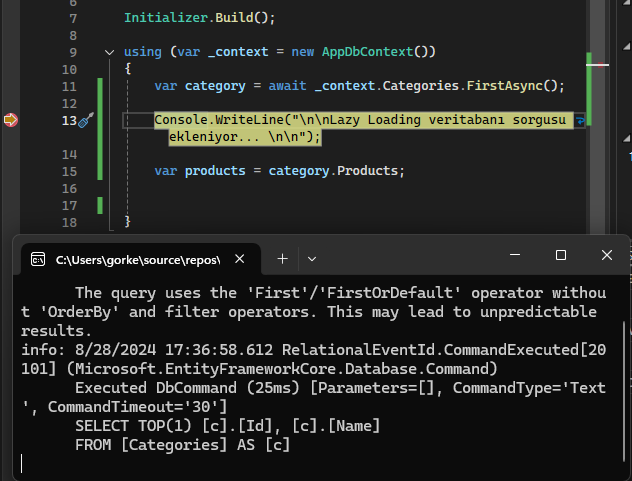
As you can see, although the query about category was sent to the database, the query about ‘Products’ was not sent because we haven’t accessed it yet.
Let’s continue with our code below.
var products= category.Products;
// Product informations regarding the category are obtained by Lazy Loading.
In the code above, the Lazy Loading method comes into play because we want to access the ‘Products’ property of the category entity, so a new SQL query is sent to the database as soon as access is provided.
The query is as follows:
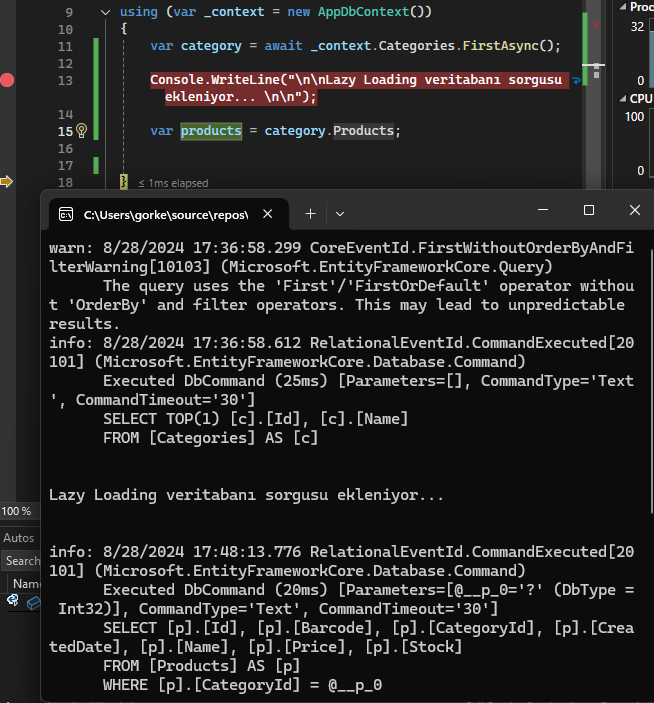
We tried to access ‘Products’ in line 15. For this reason, the Lazy Loading method was activated and the database query under the sentence “Adding Lazy Loading database query…” in the image is run to obtain the Products data related to the category. Thus, the related data is obtained.
This is how the Lazy Loading method worked.
As you noticed, we did not make any setup or configuration while using the Eager Loading and Explicit Loading methods. However, to use the Lazy Loading method, we need to specify a setup, that the Lazy Loading Method will be used in the OnConfiguring() method, and that the navigation properties in our entities are virtual.
We may be asking ourselves these questions.
There are three things we need to address, but why are we doing them?
If you want, let’s explain these issues step by step and apply them.
1) Editing the OnConfiguring() method
As you remember, we used the code “var products = category.products;”, but how does our program know that when we say “category.products”, a database query should be created for products, that it should be included in the category entity, that is, that it will use the Lazy Loading method?
Actually, it does not know, but we indicate that it should use the Lazy Loading method when it encounters such a situation by including the ‘UseLazyLoadingProxies()’ method in the OnConfiguring() method.
protected override void OnConfiguring(DbContextOptionsBuilder optionsBuilder)
{
    Initializer.Build();

    //.LogTo(Console.WriteLine,LogLevel.Information)

    optionsBuilder.UseLazyLoadingProxies().UseSqlServer(Initializer.Configuration.GetConnectionString("SqlCon"));
}
As seen above, by adding UseLazyLoadingProxies() after optionsBuilder, we specify that the Lazy Loading method will be used.
2) Installing the Microsoft.EntityFrameworkCore.Proxies package
We used ‘UseLazyLoadingProxies()’ method in OnConfiguring() method, but this method is not available in Microsoft.EntityFrameworkCore package. Therefore we need to install this package.
3) Navigation Properties must be virtual.
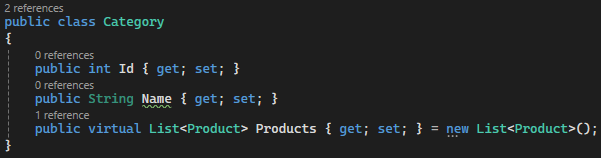
In Lazy Loading, the word ‘virtual’ is used so that Entity Framework Core can create Lazy Loading proxies. Proxies override navigation properties marked as ‘virtual’ and automatically load this data when the related data is accessed. For this reason, it is mandatory to specify navigation properties as ‘virtual’.
That’s all I have prepared for Eager Loading, Explicit Loading and Lazy Loading. I hope it was informative.
Have a nice day.




Comments 0
You cannot comment because you are not logged in.
Log in to comment.