
.webp)
Do you want your application to run faster and perform better?
That solution: Caching.
In this article, I will talk about the concepts of ResponseCache and MemoryCache under the main title of In-Memory Caching and the terms Expiration and Validation, which are two important issues in the application of these concepts.
Throughout the article, I will cover the topics in the following order:
- Introduction: Why Do We Use Cache?
- MemoryCache (Server-side caching)
- ResponseCache (Client-side caching)
- Expiration Model
- Validation Model (ETag / If-None-Match)
- ResponseCache + ETag Combination
- Summary / Conclusion
Introduction: Why Do We Use Cache?
The purpose of using cache may differ depending on your perspective.
For the user: When browsing a shopping site, they want pages to load instantly.
For the developer: It is important to use system resources efficiently rather than querying the same data from the database over and over again.
Caching offers a solution that both speeds up the user and reduces the server load for the developer.
In this article, I’ll discuss different caching methods. Let’s start with the first method, MemoryCache (Server-side caching).
MemoryCache (Server-side caching)
MemoryCache is a mechanism that temporarily holds data in memory on the server. The length of time data is stored on the server depends on a predefined duration. It remains in the server’s memory for the specified period and is deleted from memory when the time period expires.
The purpose of this is:
Storing data in memory that is used repeatedly,
Reducing database queries,
Drastically reducing the response time of the application.
Sample Scenario
Imagine you’re a bookseller. After the launch of a book predicted to be very popular, thousands of customers come to your site to inquire about the same book.
If your endpoint is like this, a query will be sent to the database for every incoming request and the page loading will slow down:
[HttpGet("books/{id}")]
public async Task<IActionResult> GetBook(int id)
{
   var book = await _context.Books.FindAsync(id);
   return Ok(book);
}
In such a case, response time will be high.
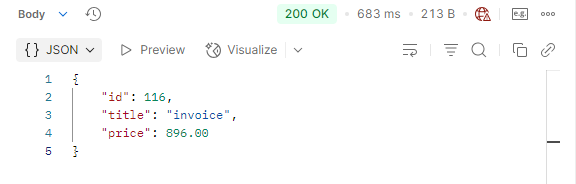
Cache-free response time: 683ms
MemoryCache Usage
So what would happen if we added MemoryCache to this endpoint?
private readonly IMemoryCache _cache;
public BooksController(IMemoryCache cache)
{
   _cache = cache;
}
[HttpGet("books/{id}")]
public async Task<IActionResult> GetBook(int id)
{
   if (!_cache.TryGetValue($"book_{id}", out Book book))
   {
       book = await _context.Books.FindAsync(id);
       var cacheOptions = new MemoryCacheEntryOptions()
           .SetAbsoluteExpiration(TimeSpan.FromMinutes(5));
       _cache.Set($"book_{id}", book, cacheOptions);
   }
   Response.Headers.Add("X-Cache", "HIT");
   return Ok(book);
}
Here’s what we did:
- We checked if there is data in the cache with TryGetValue.
- If not, we went to the database and saved the result to memory.
- We set it to be kept in memory for 5 minutes while adding it to the cache.
- Finally, with the X-Cache header, we can observe where the data comes from.
First Request:
Since the cache was still empty, the first request went to the database and the query was run.
Response time: 652 ms
Book data added to cache (will be kept for 5 minutes).
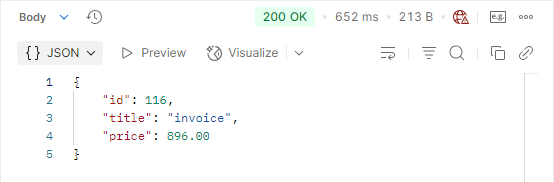
After adding caching, the initial response time was 652ms.
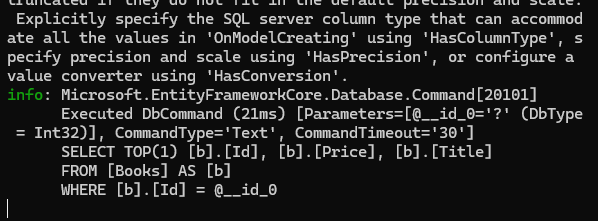
DB query in the first request after caching is added.
After the response is created as a result of this first request, the book data with id number ‘116’ is temporarily stored on the server side (we set it to 5 minutes).
Second Request:
Since the data is now in the cache, no query is made to the database.
Response time: 3 ms
X-Cache: HIT information was received in the response header.
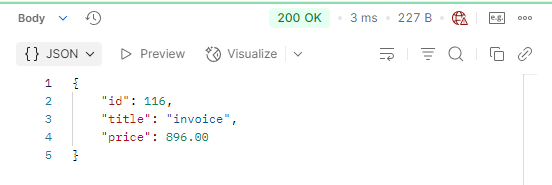
After adding caching, the second response time is 3ms
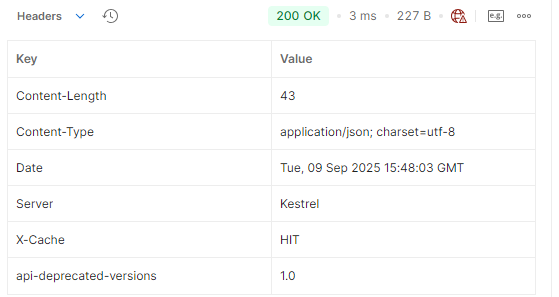
Since the data comes from MemoryCache, the added ‘X-Cache’ header received the value ‘HIT’.

After adding caching, the DB query is not sent in the second request (only the first DB query is present).
As you can see, caching not only increased speed but also prevented unnecessary database queries. This significantly reduced both the server’s CPU load and database traffic. If we hadn’t used MemoryCache, the database would have been queried repeatedly for each request, resulting in a performance penalty.
Performance of endpoints under load

One Book V1 is the version without caching, and One Book V2 is the version with memory caching.
I duplicated the same endpoint in both the non-caching and caching versions and sent requests for one minute. We can see how much better the cached endpoint performed compared to the uncached version.
Note: The response time of the endpoint without caching also decreased as the number of requests increased, this is due to the caching mechanism implemented in the database or the ORM tool.
Advantages and Limitations of MemoryCache
Advantages:
- It significantly reduces response times and improves user experience.
- It reduces unnecessary queries to the database and reduces CPU and resource usage.
- It is simple to install and use; it does not require an additional server.
Limitations:
- If the server is restarted, all data in the cache will be lost.
- Memory usage may increase for large data sets.
- It is only effective in a single server environment; in clustered systems, a distributed cache such as Redis should be preferred.
- It is not suitable for constantly changing data; the cache may become outdated.
It’s best to use MemoryCache for frequently used, rarely changing data. This improves performance and uses system resources efficiently.
That’s all I have to say about the MemoryCache section, let’s move on to the second part, ResponseCache.
ResponseCache (Client-side caching)

How client-side caching is implemented
ResponseCache is one of the client-side caching methods used in ASP.NET Core. In this method, responses returned from endpoints are stored in the user’s browser or on intermediate proxy servers.
Client-side caching is characterized by each user using their own browser cache. Therefore, users must send multiple requests to the same endpoint to benefit from the cache. This way, subsequent requests receive a cached response without going to the server, improving performance and responsiveness.
In client-side caching, the HTTP headers of the response returned from the server are examined. If the required cache headers are present, the response is saved to the browser’s cache.
When the user sends a request to the same endpoint again, the browser first checks the max-age value in the headers of the response stored in its cache:
- If the response is still valid (max-age has not expired) and validation is not required, the browser returns the response from the cache without going to the server.
- If the max-age period has expired or validation is required, the browser forwards the request to the server and the server returns a 304 Not Modified response if the data has not changed, or a new response if it has.
This mechanism reduces server load for frequently accessed data and speeds up response times.
Since the automatic operations performed by the browser are not available in Postman, I would like to give an example from the browser.
[ResponseCache(Duration = 60)]
public async Task<IActionResult> GetAllBooks()
{
   var books = await _manager.BookService.GetAllBooksAsync();
   return Ok(books);
}
We have an endpoint like this, let’s examine what will be returned as a response when we send a request to this endpoint:
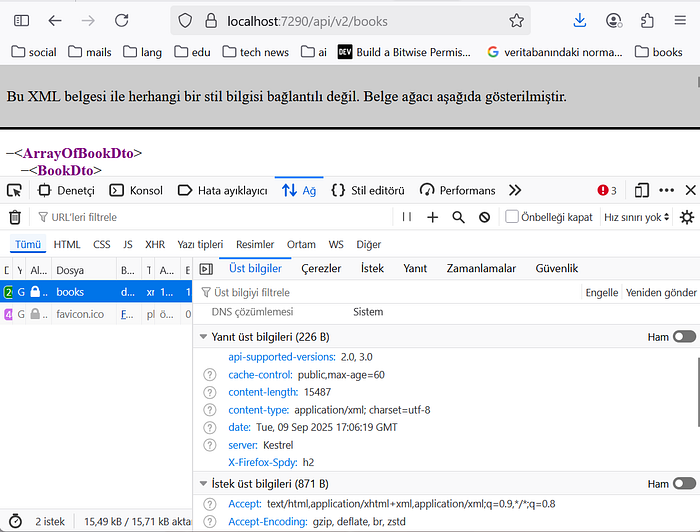
The ‘cache-control’ header in the response headers of the request sent to the relevant endpoint.
As you can see, when we sent the first request, an additional ‘cache-control’ header was added to the response headers. This header ensures that the response is saved to the browser’s cache.
Second request:
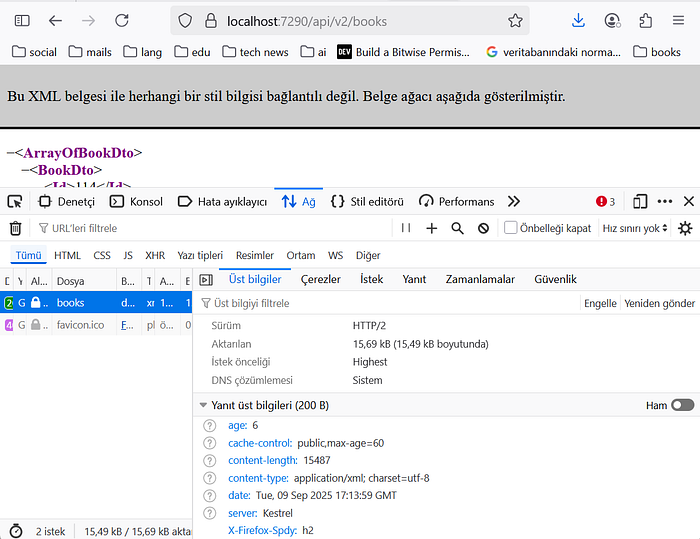
The ‘age’ field in the response headers returned from the browser cache.
Let’s examine the headers of the response received when we made the second request. As you can see, unlike the first response header, there’s an ‘age’ header. This header indicates how long the generated response has been in the cache and also indicates that the data came from the cache.
Let’s pause at this point and compare two different cache mechanisms. The main difference between these mechanisms is where the data is stored:
- Server-side caching: Data is kept on the server side.
- Client-side caching: Data is stored in the user browser or in proxies.
So, what does this gain us?
- Thanks to client-side caching, data in the cache can be used without sending a request to the server. If the data in the cache is no longer valid, the browser forwards the request to the server.
- Meanwhile, the relevant endpoint can ensure that data is delivered quickly with server-side caching.
As a result, client-side and server-side caching work complementarily to both increase performance and reduce server load.
Expiration Model and Validation Model (ETag / If-None-Match)
So far in this article, we’ve discussed data hosted on both the server and client sides, how this data contributes to performance, and why temporary storage is important. Now, let’s examine how this temporary storage process can be managed.
There are basically two different approaches: Expiration Model and Validation Model.
The Expiration Model, as its name suggests, is based on the retention of data in the cache for a specific period. In other words, the system considers data entered into the cache to be valid until a predetermined period expires. Once this period is over, the data is automatically deleted from the cache and retrieved from the source when needed. The primary goal of this model is to reduce unnecessary data duplication and ensure fast access for the specified period.
The Validation Model offers a different approach. There’s no fixed predetermined timeframe. Instead, the data in the cache is checked for up-to-dateness through validation requests from the client to the server (e.g., via ETag or If-None-Match headers). If the data hasn’t changed, there’s no need to send it back to the client, and the existing cache continues to be used. However, if the data has been updated, the new version is sent to the client, and the cache is updated. The biggest advantage of this model is that it guarantees always-up-to-date data.
In short:
Expiration Model → “Consider data valid for the following duration.”
Validation Model → “Check first if the data is really up to date.”
Both models have their uses. The expiration model is suitable for data that is updated periodically but does not require real-time updating. The validation model is particularly preferred for dynamic and frequently changing data.
If we’re looking at an example of the Expiration Model, the ResponseCache we mentioned earlier is an example. It’s used for a specific period of time. Let’s recall how we used ResponseCache.
[ResponseCache(Duration = 60)]
public async Task<IActionResult> GetAllBooks()
{
   var books = await _manager.BookService.GetAllBooksAsync();
   return Ok(books);
}
Here, the ‘Duration=60’ specified in the ResponseCache attribute determines how long the response will remain in the cache. Therefore, the ResponseCache example is an example of the Expiration Model.
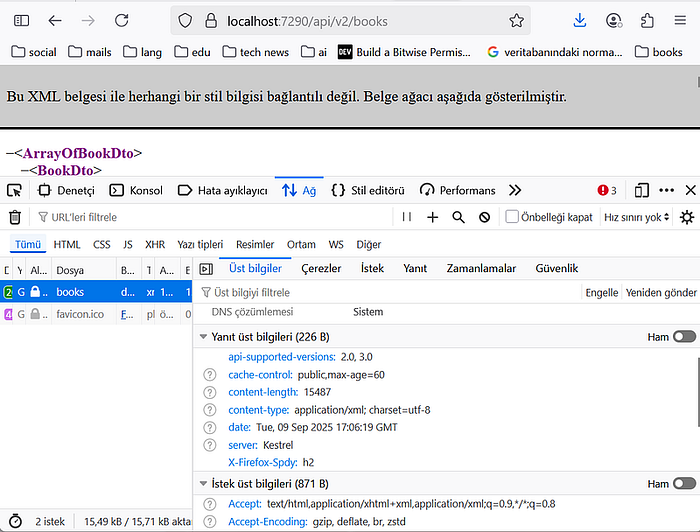
The max-age=60 information in the ‘Cache-Control’ section comes from the Duration property of the ResponseCache defined in the endpoint.
Validation Model
In the Validation Model, the length of time data remains in the cache is not fixed. Instead, the timeliness of the data determines its validity. If the data is still current, it remains in the cache, but once it becomes obsolete, it is deleted and replaced with the latest version from the source. This ensures that users always have access to the most accurate and up-to-date data.
This model typically works using ETag and If-None-Match headers. The client asks the server, “I have this version, have you made any changes?” If the data hasn’t changed, the server returns a 304 Not Modified response, saying, “Your data is still up-to-date.” In this case, the data isn’t resent, preventing unnecessary data transfer and network traffic. If the data has changed, the server sends the updated version to the client, and the cache is updated with the new content.
If you want, let’s first give an example of this and then explain how it works step by step:
[HttpGet("{id:int}")]
public async Task<IActionResult> GetBookById([FromRoute(Name = "id")] int id)
{
   var book = await _manager.BookService.GetOneBookByIdAsync(id, false);
   if(book == null)
       return NotFound($"Book with id: {id} doesn't exist in the database.");
   var eTag = Convert.ToBase64String(Encoding.UTF8.GetBytes(book.Title + book.Price));
   if (Request.Headers.ContainsKey("If-None-Match") && Request.Headers["If-None-Match"].ToString() == eTag)
       return StatusCode(StatusCodes.Status304NotModified);
   Response.Headers.TryAdd("ETag", eTag);
   return Ok(book);
}
What is going on in this code?
Step 1 — Check if the book exists:
The user requests a book with a specific id. If the book isn’t found (for example, if it’s been deleted), we return a NotFound. In this case, the data in the cache is no longer valid.
Step 2 — Generating the uniqueness key (ETag):
We create a hash using some properties of the book data (Title + Price). This hash acts as a unique signature of the data in its current state.
Step 3 — Verifying the user’s cache:
We check the If-None-Match header that comes with the request. This header tells the user which version of their cache is available. If this value matches the ETag we created, we know the data hasn’t changed. In this case, there’s no need to retrieve data from the database again, and we return a 304 Not Modified. In other words, we’re telling the user, “The data in your cache is still up-to-date; you can continue using it.”
Step 4 — If the data has changed:
If the ETag values don’t match, this means the data has been updated. In this case, we return the new data with a 200 OK and also add the new ETag value to the response header. This way, the client can reference the updated data in future requests.
The response header obtained when we first send the request:
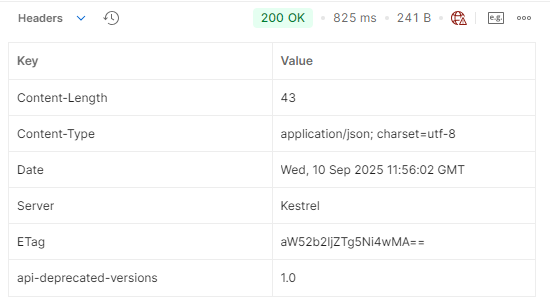
The ETag value added after the first request will be checked for up-to-dateness with this value.
When making the second request, we will add If-None-Match to the request header to ensure that the endpoint is up-to-date.

Added If-None-Match to the second request header
The response after sending the request:
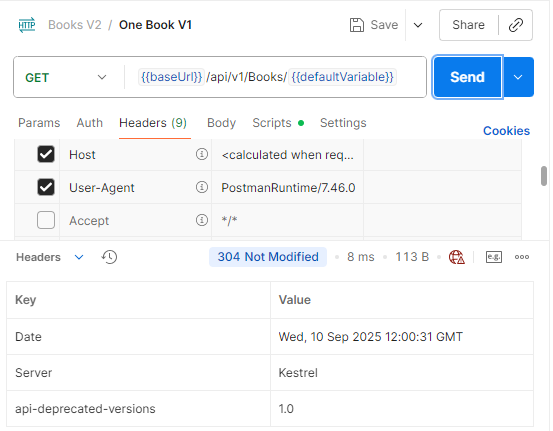
304 Not Modified was returned because the data was unchanged.
Because the data in the cache and the database are identical, the response returned 304 Not Modified. When browsers see this response, they return the data from their own cache to the user.
If you want, let’s make changes to our data and observe whether the data in the cache has changed:
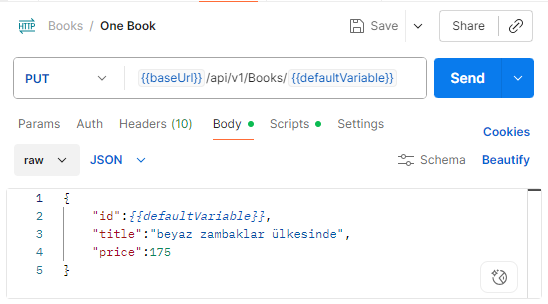
With this request, I changed the book’s title to “In the Land of White Lilies.” Now, the data in the client cache and the data in the database are different.
Let’s see what the response will be when we want to access this book:
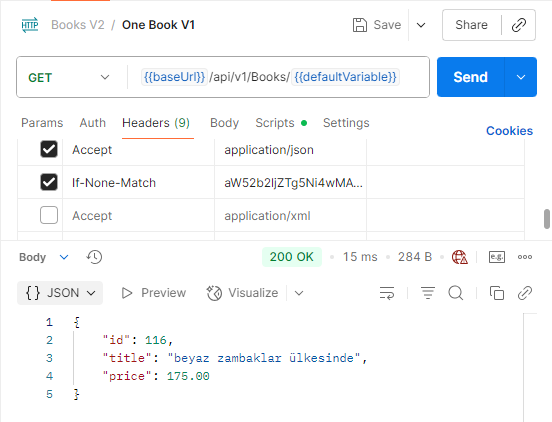
We sent a request to the endpoint with the ETag value from the first request, and we received updated data.
The data from the first request also included an ETag value. This ETag value represented the data’s unique key. In the second request, we added this ETag value to the header with an ‘If-None-Match’ to ensure validation at the endpoint.

The ETag value in the incoming response header has changed.
The unique key we added when submitting the request is different from the ETag value in the response. This is because the ETag values were compared at the endpoint. Since we changed our data, the ETag value of the data in the database changed, resulting in an inequality. Therefore, the updated data with the new ETag value was sent as the response. Now, when a new request is submitted, this ETag value is used to ensure cache usage if the data is the same, providing a performance and speed advantage.
If you’d like, let’s resubmit the request with this new ETag value. If the current ETag value matches the ETag value of the data on the server, a 304 Not Modified will be returned.
When we made a request with the new ETag value, 304 Not Modified was returned.
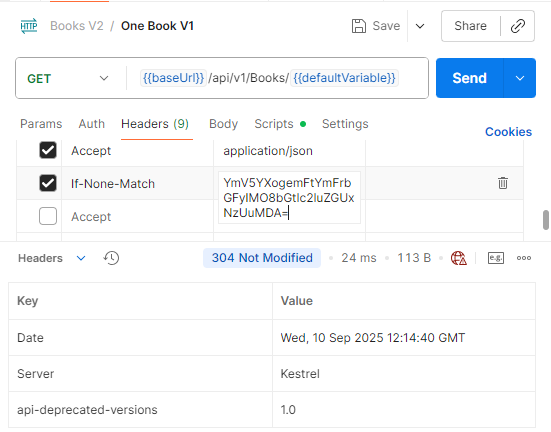
With this structure, we used cache to ensure data up-to-dateness.
In short, using the Validation Model prevents unnecessary database queries and ensures that the client always has access to up-to-date data. This is precisely the power of the Validation Model: instead of being tied to a fixed timeframe, we decide whether to use the cache based directly on the currentness of the data.
ResponseCache + ETag Combination
Up to this point, we’ve seen two different approaches: the Expiration Model and the Validation Model. Each model has its own advantages and disadvantages:
Expiration Model:
Advantage: Simple and fast. Data is kept in the cache for a specified period of time, and a response is received directly from the cache for each request.
Disadvantage: Even if the data changes before the expiration date, the client can use the old data, so data up-to-dateness is not guaranteed.
Validation Model (ETag):
Advantage: Data is always kept up-to-date. The client checks whether the data has changed, preventing unnecessary data transfer.
Disadvantage: A control request is sent to the server with each request. This creates a small overhead and can slightly increase the total traffic on the system.
This is where the combination of ResponseCache and ETag comes in. By combining the two, we can achieve both high performance and up-to-date data guarantees:
Thanks to ResponseCache, data is quickly transmitted to the client during the cache period, thus reducing the need to go to the database for frequent requests.
When the Validation Model is integrated with the ETag, the data in the cache is checked for up-to-dateness. If the data has changed, the ResponseCache is considered invalid and updated with the new data.
This ensures both high performance and ensures that the client always has access to up-to-date data. This approach is ideal for optimizing both CPU load and network traffic, especially in high-traffic applications.
Let’s give an example of ResponseCache + ETag Combination.
[HttpGet("{id:int}")]
[ResponseCache(Duration = 60, VaryByQueryKeys = ["id"])]
public async Task<IActionResult> GetBookById([FromRoute(Name = "id")] int id)
{
   var book = await _manager.BookService.GetOneBookByIdAsync(id, false);
   if(book == null)
       return NotFound($"Book with id: {id} doesn't exist in the database.");
   var eTag = Convert.ToBase64String(Encoding.UTF8.GetBytes(book.Title + book.Price));
   if (Request.Headers.ContainsKey("If-None-Match") && Request.Headers["If-None-Match"].ToString() == eTag)
       return StatusCode(StatusCodes.Status304NotModified);
   Response.Headers.TryAdd("ETag", eTag);
   return Ok(book);
}
I added the ResponseCache attribute to the endpoint I gave in the previous example.
Let’s send the first request to our endpoint where we applied the ResponseCache + ETag combination.
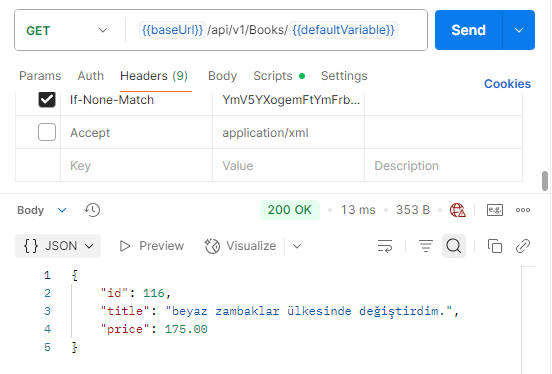
The first request made after the combination.

In the second request after the combination was applied, we retrieved the data from the cache with the expiration model.
In the processes we’ve performed so far, we cached the data for the first request, and this allowed us to quickly return the data from the cache for the second request within the timeframe specified by ResponseCache (max-age=60). In other words, the second request was answered with the cached response without going to the database, significantly reducing response time.
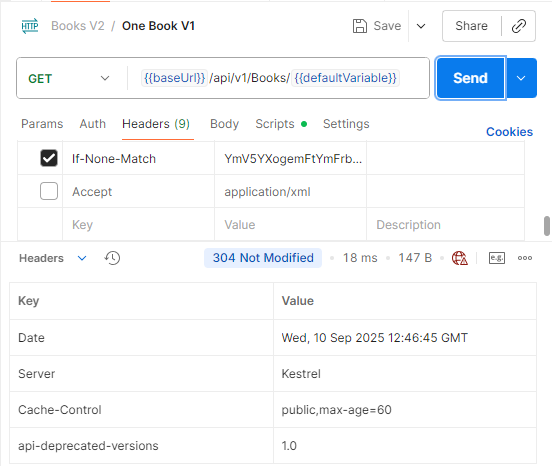
However, when the time specified in the ResponseCache attribute expires, the data in the cache is considered expired, and the controller is rerun on the next request. At this point, the Validation Model comes into play. The controller checks whether the data in the cache is up-to-date with the If-None-Match header from the client. If the ETag values still match, the server returns a 304 Not Modified, and the client uses the data from its own cache.
This way, the Expiration Model ensures high short-term performance, while the Validation Model ensures data is up-to-date. In other words, the ResponseCache + ETag combination offers the best results in terms of both speed and accuracy.
Summary / Conclusion
In this article, I’ve discussed what I’ve learned about In-Memory Caching, ResponseCache, and ETag / Validation Model concepts in ASP.NET Core. I hope I’ve contributed something to the concepts I’ve discussed.
Have a nice day.



/1_LgVUzoOCSWo0HN4CosssOQ.webp)
Comments 0
You cannot comment because you are not logged in.
Log in to comment.